Android
Draw with touch or a compatible pen, keep local recovery copies and prepare your manga for export. Android 8 or later.
Release bundle prepared · Publication pending KathakaTHE MANGA CREATION STUDIO
A considered studio for manga artists, illustrators and storytellers. Sketch, compose and bring your characters to life — in one beautifully focused workspace.
Try Kathaka free ↗Explore the workspace ↓Free 30-day trial · Check your device before you downloadLESS SWITCHING. MORE STORYTELLING.
A drawing desk, a character bible, a production room. One place to build a manga that feels unmistakably yours.
Shape a script into pages. Find the rhythm in panels, pauses and spreads before you commit a single ink stroke.
Write an outline, break it into scenes and build a shot list with action, dialogue, lens and camera notes. Turn the plan into an editable 16:9 storyboard book, then test a scene’s pacing in an animatic.
Storyboard creation prepares editable frames and dialogue; artwork is drawn or imported separately. Plan up to 40 scenes and 128 shots. Scene animatics currently support sequences up to 120 seconds.
Explore the director’s workflow ↗Draw, import and refine your own artwork. Kathaka focuses on the creative tools you use, without bundled AI models or generation runtimes.
Explore all 20 product areas in the current prototype. Every feature serves the page in front of you.
Automatic local checkpoints, portable projects and recovery workflows.
Responsive desktop, tablet and phone layouts, shortcuts and configurable type.
Scripts, page templates, panels, gutters, spreads, reading order and the Director film storyboard workflow.
Pressure-aware brushes, stabilization, fills, erasing and panel cutting. Physical stylus qualification is pending.
Editable dialogue, shapes and tails, vertical Japanese, furigana and overflow warnings.
Bring your own artwork into the studio with rights and provenance records.
Import artwork candidates, review continuity and compare versions before applying an image to the page.
Version character sheets, costumes, props and locations; reuse approved references.
Preflight resolution and approvals; export PDF, PNG, CBZ, EPUB and webtoon slices.
Reusable artwork, provenance and rights records, and portable project copies.
Layer groups, masks, clipping, blend modes and adjustment workflows.
Vanishing points, perspective rulers, reference boards and background guides.
Pose and camera staging to prepare editable panel references.
Review dialogue overflow, reading order, gutters and print risks. You approve corrections.
Named versions, visual comparisons, panel comments and review checkpoints.
Page assignments, review permissions and explicit conflict review.
Camera moves, transitions, dialogue timing, audio tracks and video export.
Bundled MIT brush, importer and exporter starters, with explicit permissions.
Tiled rendering, background processing, bounded undo memory and diagnostics. Prototype book limits apply.
Installer and recovery tooling, migrations and release checks. Cross-platform production qualification remains in progress.
Keep the adjustable documentation drawer beside your canvas. Read 24 practical chapters, search for a tool and follow the steps in your language. All four handbooks are included offline in the app.
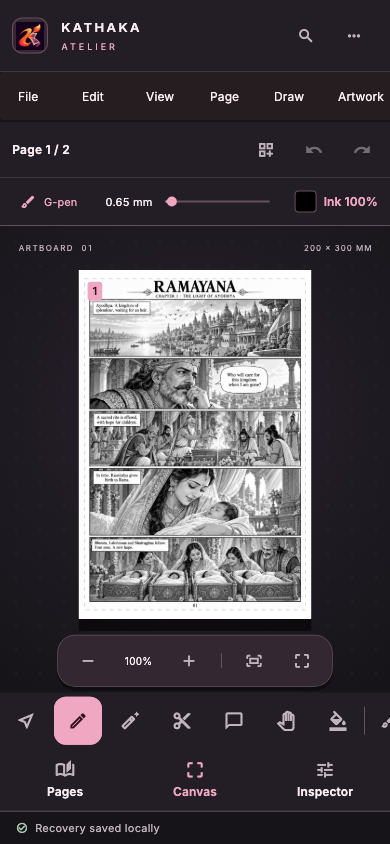 SMALL SCREEN.
Your projects live locally. Sketch, ink and refine your pages with drawing tools, starter extensions and publication exports, without downloading image-generation models.
Mac is the tested development platform. Windows, Linux, Android hardware, accessibility and clean-machine release qualification are still in progress.
Try before you buy. Check your computer first, then use the free 30-day trial to test your own projects. No payment is needed to start the trial. Your projects stay on your device.
Before downloading the full Windows pack, run the small offline checker on the PC you will use. Extract it and double-click Check-Kathaka.exe. It does not install Kathaka, change drivers or send hardware information to us.
The checker is an unsigned Windows x64 candidate. It checks OS, processor, RAM and free space. Display, drivers and real project speed still need trial testing. If it reports incompatible or unverified, stop and correct the issue before installing or paying.
Draw with your pen or mouse, save and reopen a representative project, and export a page. Check the results on a representative manga project. Minimum requirements do not guarantee smooth performance.
If your workflow fails or is too slow, do not pay. Before creating a new invoice, the studio owner must review your recent compatibility report and successful trial confirmation for the intended device and use. Live online checkout is currently unavailable.
Draw with touch or a compatible pen, keep local recovery copies and prepare your manga for export. Android 8 or later.
Release bundle prepared · Publication pendingThe shared editor is being prepared for local Apple-device testing. App Store distribution is a separate release.
Device testing in preparationThe Mac candidate includes starter extensions, fonts and local creative engines. Availability follows the published package register.
Local candidate · Release qualification continuesAfter checking compatibility, try the free trial. The editor includes drawing tools, starter extensions and fonts, without bundled AI models. Extract the complete pack and run Kathaka-Setup.exe once.
CPU candidate · UnsignedSource and an Ubuntu build workflow. Linux runtime and hardware qualification continue before a prebuilt installer is published.
Developer preview · Build tools requiredRelease downloads appear here when published. Play Store availability will be announced after Google review.
The small checker and Setup check hardware eligibility; an incomplete or failed check stops Setup. Hardware inventory cannot certify real project speed or driver compatibility. Use the free trial before paying. The editor uses local files. Check drawing, saving and exporting on your own device.
| Windows | macOS | Linux | |
|---|---|---|---|
| System | Windows 10 22H2 or Windows 11, 64-bit | macOS 14 Sonoma or later | Ubuntu 24.04 LTS or later, 64-bit (other distributions with glibc 2.39 are untested) |
| Processor · minimum | 64-bit x86 processor with at least 4 logical processor threads | Apple silicon (M1 or newer) or a 4-core Intel Mac | 64-bit x86 processor with at least 4 logical processor threads |
| Processor · recommended | 8 or more logical processor threads for large books | 8 or more logical processor threads for large books | 8 or more logical processor threads for large books |
| Memory · minimum | 8 GB | 8 GB | 8 GB |
| Memory · recommended | 16 GB | 16 GB | 16 GB |
| Free disk · minimum | 4 GB | 4 GB | 4 GB |
| Free disk · recommended | 8 GB for projects and artwork | 8 GB for projects and artwork | 8 GB for projects and artwork |
| Graphics · minimum | Any DirectX 11 graphics, integrated is fine | Metal graphics (every Mac that runs macOS 14) | OpenGL 3.3 graphics with current Mesa or vendor drivers |
| Graphics · recommended | Any DirectX 11 graphics, integrated is fine | Metal graphics (every Mac that runs macOS 14) | OpenGL 3.3 graphics with current Mesa or vendor drivers |
| Display | 1280 × 800 minimum, 1920 × 1080 or larger; pen tablet optional | 1280 × 800 minimum, 1920 × 1080 or larger; pen tablet optional | 1280 × 800 minimum, 1920 × 1080 or larger; pen tablet optional |
No AI models are bundled. Android requires Android 8 or later, two CPU cores and 2 GB RAM. Project size and device performance affect the experience; test your drawing and export workflow before purchasing.
Professional needs only your licence key: enter it directly in the installed app, with no app login or email-service setup. Connect once for key validation; Professional then works offline on the activated device. The optional 30-day trial requires registration, email verification, sign-in and internet access. The public website has no login. Projects remain on your device.
Use the free trial first. Before a new invoice can be created, the studio administrator must review a fresh compatibility report and your successful trial on the intended device. If performance is unsuitable, do not buy. After verified payment, the administrator issues a licence in the CMS and securely delivers your key with a handbook link. Email delivery is optional. Choose Use licence key in Kathaka and activate once online; no app sign-in is required. Professional then works offline on that device. The payment-provider interface is prepared; live checkout and pricing are not configured yet.
Drawing, lettering, page composition, local recovery and publication tools. AI generation and bundled models have been removed.
Yes. Create an account, verify your email, sign in and update your customer profile from the account page. Payments and online invoicing are planned for a future release.
Yes. They are captures of the app and its real specialist workspaces, including automated layout captures using the Ramayana demo. Some specialist captures retain earlier Manga Studio branding. They are not generated interface concepts.
Your manga projects and recovery files stay on your device. Account profile changes are stored by the account service; project files are not automatically uploaded.
Choose an available package from the download register. The Windows CPU candidate has been built and tested locally. Other platform packages, GPU support, physical stylus testing, signing and production qualification have separate release checks.